MakerGear M2 Reviews: See Why 0 Shoppers Rated It 0 Stars!
Some users say the MakerGear M2 3d printer is a game-changer. Others aren’t impressed. See what 0 real folks had to say — unfiltered.
 Supermod
  Moderator
 Recaptor
 In-Depth Review of MakerGear M2: A Professional-Grade 3D Printer
In the crowded field of professional 3D printers, the MakerGear M2 stands out as a robust choice for advanced users who prioritize precision and material versatility. Launched in 2012, this FDM/FFF type printer has carved a niche for itself by catering primarily to professionals engaged in prototyping and engineering. Despite its years in the market, the M2 maintains relevance through core features like its precise printing abilities and upgrade flexibility, creating an overall impression that it blends reliability with user-focused engineering.
Specifications and Core Features
On paper, the MakerGear M2 displays a well-rounded specification list that supports its professional designation. Its build volume of 640 cubic inches (8 x 10 x 8 inches) provides a respectable workspace for mid-sized prototypes. With a maximum extruder temperature of 572°F and heated bed temperatures that reach up to 230°F, it's capable of handling a wide variety of filaments such as PLA, ABS, PET, and polycarbonate. The presence of a 100-240 Volt internal power supply suggests compatibility with global power standards, enhancing usability across locations.
Key mechanical features include a direct drive extruder system and quick-swap nozzles available in multiple diameters from 0.25mm to 0.8mm, allowing fine-tuning for different material and detail needs. While the printer has just one extruder, it supports dual extruders in a non-independent fashion. It allows multi-material printing of up to two materials simultaneously, which broadens its functional scope significantly.
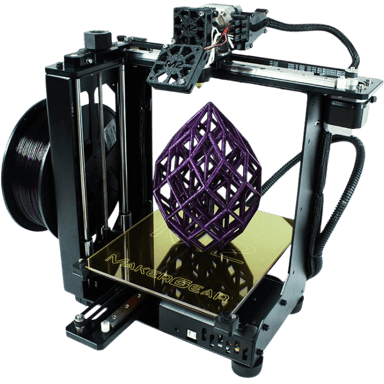
From a build perspective, the 26.5 lb. frame employs a glass bed and a strong combination of linear rails, belts, and rods for motion, focusing on stability and print quality. However, it lacks an enclosure, which could impact printing with more temperature-sensitive or odoriferous materials. Manual bed leveling and calibration are required, indicating a more hands-on approach than many modern printers with automatic systems.
Design & Build
The MakerGear M2's physical dimensions (21 inches wide, 24 inches deep, and 16.5 inches high) make it a substantial device that demands a decent amount of workspace; approximately 2 square feet. It is pre-assembled, saving setup time, but this is balanced by a significant weight of 26.5 pounds. The open frame design and glass build plate contribute to consistent heat distribution, albeit with a trade-off for exposure to ambient air and potential temperature fluctuations, which professionals must consider during print planning.
On the usability front, a 2-inch non-touch display with a 128x64 resolution provides basic operational feedback, though it shies away from the touchscreen convenience many expect today. Despite this, the absence of a filament runout sensor and power-loss recovery features suggests that continuous long prints require some supervision. Nevertheless, its solid frame and precise motion system should minimize vibrations and mechanical drift during printing.
Performance Expectations
Performance-wise, the M2 offers an official maximum print speed of 150mm/s, though realistic effective speeds are closer to 80mm/s. This balance indicates a thoughtful engineering effort to maintain quality over pure speed. This is borne out in its print accuracy, rated at 100 microns and a commendable print success rate of 90%, which are crucial for professional prototyping. The recommended print quality rating of 8 out of 10 also attests to its capability in delivering detailed prints with good surface finish.
Nevertheless, some advanced, automated features like spaghetti or fault detection and print recovery are not available, and the noise level at 55 decibels during operation may be noticeable in quieter work environments. Moreover, the manual first-layer calibration and reliance on glass adhesion plates mean users should have some expertise to optimize print adhesion consistently.
Material Compatibility and Printing Versatility
One of the MakerGear M2's strongest suits is its broad compatibility with filament types, including PLA, ABS, TPU, and polycarbonate, among others, making it versatile for different prototyping materials. Its support for third-party filaments further enhances this flexibility, allowing users to experiment with a wide range of supplies. However, filament drying is required as it lacks a dry box or auto-loading functions, which means professionals must pay attention to filament storage conditions to avoid print quality issues.
On multi-material printing, the machine supports printing with two materials but lacks independent dual extruders, which can limit simultaneous dual extrusion complexity. The direct drive extruder helps when working with flexible filaments like TPU, a benefit for users aiming to produce complex parts with varying materials.
Pros & Cons
Pros
- Robust build volume and excellent print accuracy for professional-grade prototypes.
- Supports a wide variety of filaments, including high-temperature materials.
- Flexible nozzle sizes and a quick-swap system improve customization and maintenance.
- Direct drive extruder system aids in printing flexible and varied materials.
Cons
- Lacks automatic bed leveling and filament runout detection, increasing manual involvement.
- No enclosure or air filtration affects printing with odor-producing or temperature-sensitive materials.
- No power loss recovery or fault detection features may reduce reliability for extended prints.
- The user interface is basic with no touchscreen, limiting ease of navigation and feedback.
Price and Value for Money
The MakerGear M2 is priced at $1999 at MatterHackers, a figure that reflects its professional-grade features and US manufacturing origin. Given its one-year warranty and the comprehensive range of printable materials supported, this investment is justified for advanced users and small businesses seeking a durable 3D printer for versatile prototyping tasks.
The allowance for upgrades, such as a multi-material kit and enclosure, also adds long-term value for users wanting to expand capabilities without replacing the unit. Nevertheless, those who desire plug-and-play simplicity, automatic calibrations, or heavily automated features might find the M2 less suitable for their needs. It excels as a reliable workhorse in a skilled operator's hands rather than a beginner's occasional-use device.
Quick Take
In short, the MakerGear M2 offers a substantial build volume and excellent precision that professionals appreciate. Its flexibility with multiple filament types and nozzle options makes it a versatile tool, though it requires manual setup and monitoring. If we look at the numbers alone, it remains a solid contender for dedicated users prioritizing quality and adaptability over automation.
Closing Recommendation
The MakerGear M2 may be ideal for advanced users who have the experience and patience for manual calibrations but want a reliable 3D printer capable of handling diverse materials and moderately sized projects. It appears to perform best in controlled environments where print supervision is feasible, helping users achieve consistent prototyping results with a machine that supports upgrade paths for increased future capability. Its sturdy build and broad filament compatibility make it a valuable asset for engineering and design studios focused on FDM printing.
Verdict
Rating: Based on the specifications and overall feature set, we believe MakerGear M2 deserves 4.2 out of 5.
- Winner Feature => Exceptional print accuracy and material compatibility enhance professional prototyping capabilities.
- Needs Improvement => The lack of modern automation features limits ease of use and unattended printing potential.
Reviews 0
The good, the bad, and the brutally honest.Average Rating


More 3D Printers 453
Unlock more awesome finds.